AerVPN
Included on every plan, Free too

Advanced Protection

Four filtering layers that run at the DNS level whenever the VPN is on — so they cover every app on the device, not just the browser.

Four layers, four switches

Turn on only what suits you. Changes apply immediately, even mid-connection.

Block ads

Ad domains never resolve, so the banner or pre-roll is gone before any bytes are spent on it.

Block trackers

Analytics and profiling endpoints are cut off, so apps stop reporting what you do back to third parties.

Block malicious websites

Known phishing and malware domains are refused at resolve time — the page never gets a chance to load.

Content controls

Filters adult and unwanted categories on the device — useful on a phone a child also uses.

In the app

One screen, one badge, no menus to dig through.

Everything lives under Advanced → Advanced Protection. The badge on the row tells you how many of the four layers are on, so you never have to open it just to check.

  • Filtering happens on our node, not on your device — no battery cost
  • Works in every app: games, in-app browsers, background services
  • Your choice is stored per device and survives reinstalling
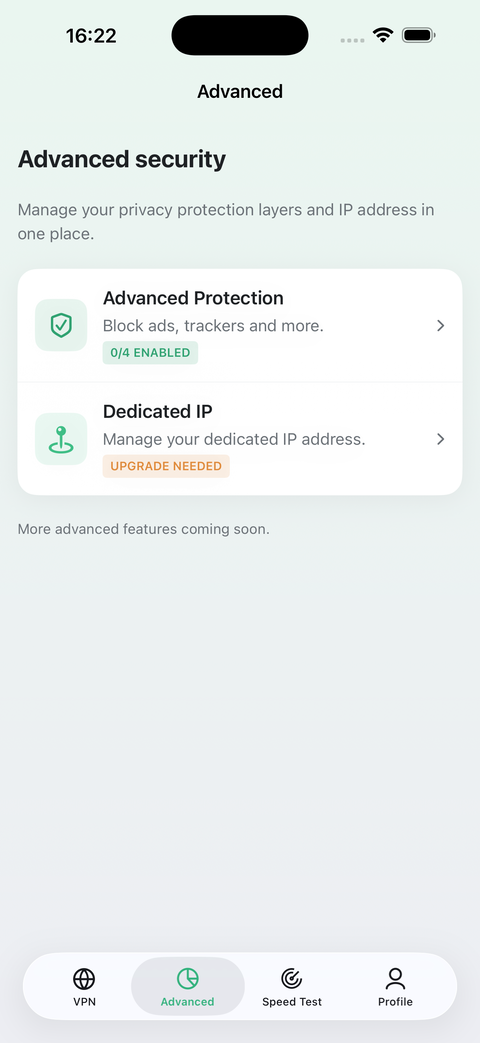
Advanced Protection screen

Turning it on takes three taps

Connect

Protection is enforced on the node your traffic goes through, so it only applies while the VPN is on.

Open Advanced

Second tab in the bar. Tap the Advanced Protection row.

Flip the switches

Each layer applies right away — no reconnect, no restart, no waiting.

My Filters — your own rules, on top

A Premium add-on. Add the domains and IP ranges you want blocked, and the domains you always want through, even if a list caught them by mistake.

Block what the lists miss

Type a domain and every subdomain of it stops resolving. Add an IPv4 address or range and connections to it are refused on the node.

Unblock what they got wrong

An always-allow domain overrides every layer, including malicious-site blocking — your device, your call.

Instant, per device

Rules apply on the node the moment you save them, no reconnect. They live with your device and work in every app.

Counted, never logged

The App shows how many requests your rules refused. The resolver keeps that number and nothing else.

What DNS filtering cannot do

These layers work by refusing to resolve domains. An ad served from the same domain as the content around it — a sponsored post inside a social feed, for instance — shares the address of the thing you came for, so blocking it would break the app. Filtering also stops when the VPN is off, because it lives on our node rather than on your phone. Anyone promising a blocklist that catches everything is selling you something.

It's already in the app

Nothing to buy, nothing to activate — install and switch it on.