A fixed address in the city you pick, reserved for your account inside AerVPN — no other AerVPN user shares it. For the days when sharing an exit IP with strangers is the problem.
On a shared IP you inherit whatever the previous person did with it. A dedicated one has no such history.
Company dashboards, admin panels and databases that only accept known addresses will accept yours.
Sites rate-limit shared VPN exits because hundreds of people appear as one visitor. Yours carries only your AerVPN traffic.
Banking and email apps sign you out when the address keeps changing. A fixed one keeps the session alive.
No other AerVPN user routes through your address, so their behaviour can't land it on a blocklist.
The Dedicated IP row sits under Advanced, next to Advanced Protection. Pick which of our cities the address should live in — the choice matters, because the address determines where sites think you are.
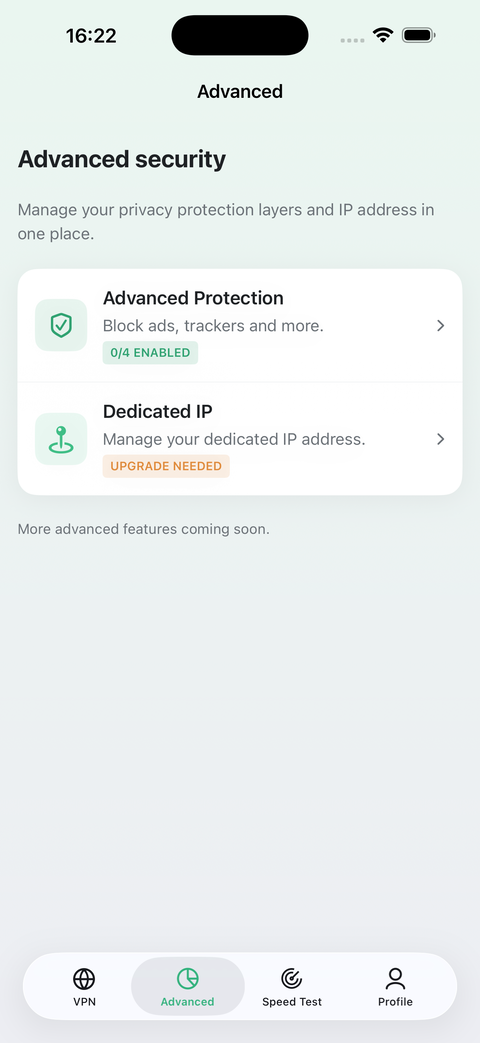
The add-on is only available on a paid plan — a Free account gets turned away by the server, not just hidden in the UI.
Open Advanced → Dedicated IP and choose which of our locations the address should belong to.
We reserve an address on that node and bind it to your account. It then shows up on the same screen.
The row is visible in the app and marked “upgrade needed”, so you can see what it does before paying for it.
Choose a city and request the address from inside the app. Everything else about Premium stays as listed on the pricing section.
A dedicated address is the opposite of hiding in a crowd: your traffic is the only traffic leaving it, which is exactly what makes allowlists work and exactly what makes it more identifiable. If blending in with other users is what you came for, stay on the shared exits. Addresses are also finite per city — if the city you want is out of stock we will say so rather than quietly hand you another one.

Install it, go Premium when you need to, then request the address.